Set the connection properties in the respective boxes: host name, port, protocol, base DN.
Check the use SSL/TLS box if it is a SSL Connection.
Connection Name
A unique name for this connection
Host
The name or IP address of the computer that hosts the directory
Port
The port number of the directory server (most cases 389 for non ssl and 636 for ssl connection)
Protocol
The protocol that is in use, which can be LDAP v2 or LDAP v3. This is usually LDAP v3, but can be LDAP v2 to support older directories
Base DN
(Optional) The base distinguished name of the directory. If none is given, the browser is still able to connect, providing that the directory makes this information available
Use SSL/TLS
You must check this box if you want to establish a connection to the server using SSL/TLS
To check the connection parameter you entered you may click to Test Connection.
Click Next when done.
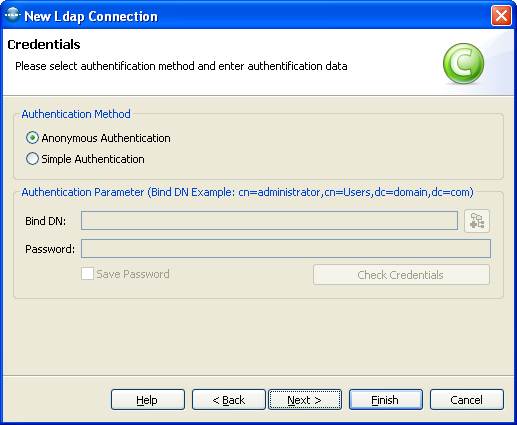
In the wizard's second page select the authentication method. If you choose the simple Authentication method also enter your bind DN or user and bind password. To check the authentication parameter you entered you may click to Check Credentials. Click Next when done.
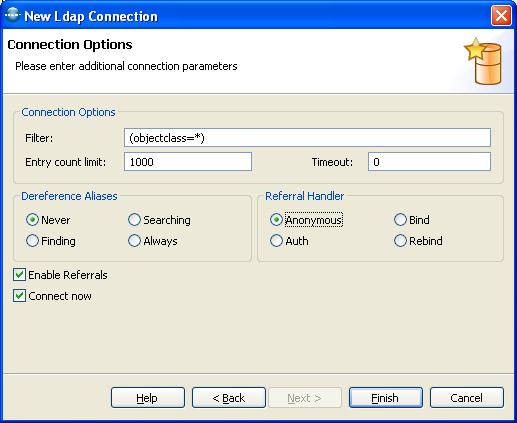
In the wizard's third page select the additional connection parameter. If you are not sure what they should be just leave them to default and click Finish.
Dereference Aliases
Sets a preference indicating whether or not aliases should be dereferenced, and if so, when
Never - do not dereference aliases
Searching - dereference aliases when searching but not when finding the base
Finding - dereference aliases when finding
Always - dereference aliases when finding the base object and when searching
Entry count Limit: The maximum number of search results to return for a search request.
0 means no limit. Default is 1000.
Timeout: The maximum time in seconds that the server should spend returning search results. This is a server-enforced limit. The default of 0 means no time limit.
Enable Referrals: Determines whether to automatically follow referrals or not. Check the box to follow referrals automatically. Default is true.
Connect Now: Connect to the server on finish.

|
LDAP Admin Tool Home Page |