 drop down menu (top right hand tab
menu)
drop down menu (top right hand tab
menu)Ldap Admin Tool allows you to create groups directly under other groups or under the root element.
To Create a new group:
Open the New group wizard, type a name for the new group and fill in the required fileds, to open the New Group Entry wizard choose from one of the following options
drop down menu (top right hand tab
menu)
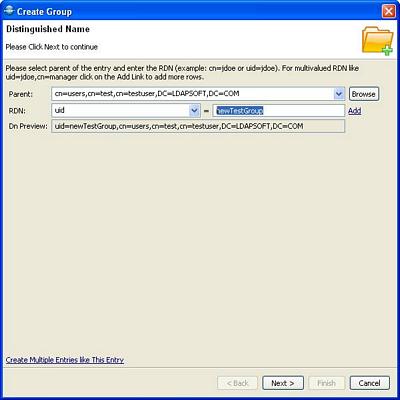
|
Fields/Links |
Description |
|
Parent |
Parent DN of the new Group. Type in the DN or browse, to select the DN. The drop-down list provides a history of recently used DN's. |
|
RDN |
RDN consist of identifier like (uid, cn, sn ..) and the name of the attribute. If it is a multivalve RDN like uid=jdoe,cn=manager click the add link to add more RDN rows. |
|
Add link |
For multivalue RDN click here to add more rows |
|
DN Preview |
Shows the complete DN of the new entry |
|
Create Multiple Entries like this entry |
Click here to create multiple entries |
When you click create multiple entries link it will add one more row where you can define how many entries to create and also the prefix to append. To remove this row, click the remove link.

When all the fields are completed, click the Next button to provide
attribute values. All fields in red must be completed to create
entry(ies) or you will get an error.
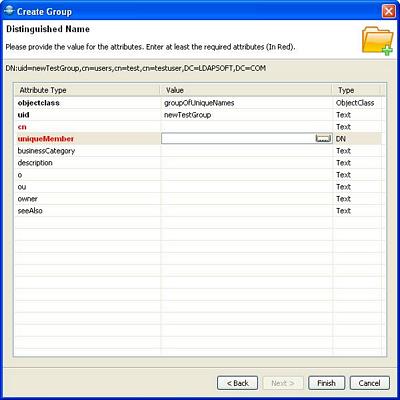
Click Finish when done and it will create entry in the directory provided you have the permissions to do so and also it will show the newly created entry in the ldap explorer tree.
Related Links: