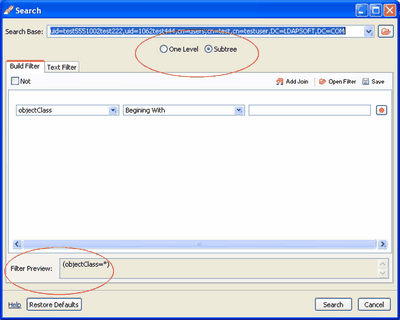
You can perform more complex searches using the Search dialog. You can open the search dialog from the entry popup menu (Right Click) or from the main menu Search | Search
The Search dialog lets you search one of the following:
Complex Search Operators
|
Complex Search |
Example Filter |
Results of Example Filter |
|
Equal To (=) |
mail=test@ldapsoft.com |
All entries with email test@ldapsoft.com |
|
Not Equal To (! =) |
(!(title=manager)) |
All entries with a title other than manager |
|
Greater Than or Equal to (>=) |
sn>=t
|
All entries with a surname starting t, and any subsequent letter of the alphabet including Tony, Whiteford and Zelda |
|
postalcode>=5000 |
All Entries with a postal code greater than or equal to 5000. |
|
|
Less Than or Equal to (<=) |
sn<=t
|
All entries with a surname starting with 't', and any preceding letter of the alphabet including Tony, Shelly and Adrian |
|
postalcode<=5000 |
All Entries with a postal code less than or equal to 5000. |
|
|
Beginning with |
mail=test* |
All entries with email that begins with test including test@ldapsoft.com, test@nowhere.com. |
|
Not Beginning with |
(!(mail=test*)) |
All entries other than those in which the email begins with test. |
|
Containing |
sn=*ar * |
All entries with a surname that includes the letter ar, including marry and mary. |
|
Not Containing |
(!(sn=*ar*)) |
All entries with a surname that does not contain the letterar |
|
Ending in |
sn=*e |
All entries with a surname that end with s, Including Doe and Dole., |
|
Not Ending in |
(!(sn=*e)) |
All entries with a surname that do not end with e |
|
Present |
sn=* |
All entries with a surname. |
|
Not Present |
!(sn=*) |
All entries with no data in the attribute sn, and all entries that do not have the attribute sn |
|
Similar To (~=) |
sn~=marry |
All entries with a surname that sounds like marry, including marie, maria |
|
Not Similar To (~=) |
(!(sn~=marry)) |
All entries that do not have a surname similar to marry, including entries that do not have the attribute sn |
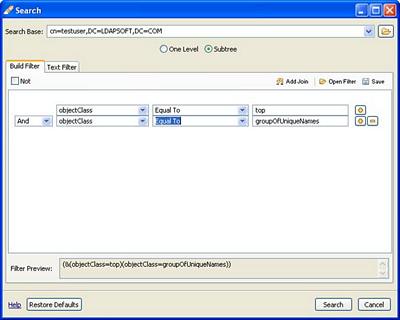
To search for groups (ObjectClass=top And ObjectClass=groupOfUniqueNames), click (+) button to add one more row then select the equal to from the drop down and type in the "groupofUniqueNames". The filter preview will show you the filter as you are constructing the filter. To remove any filter row click the (-) button.
Note: You can also add "Not" Operator to the query by checking the Not checkbox on the top left hand side.
Note: You cannot mix the operators (And-Or) in one filter set, to add both in one query click on the Add Join button on the top.
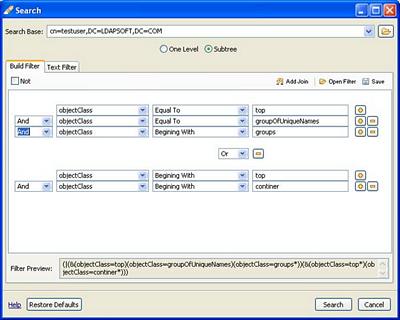
You can save and retrieve the saved filter using the Open Filter and Save Filter buttons.
Related tasks

|
LDAP Admin Tool Home Page |