 CSV Export button
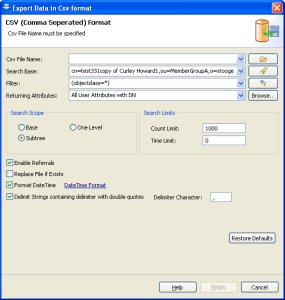
This dialog is used to export entries to csv files.
To open the dialog choose one of the following options
CSV Export button
» In the exported file, if any attribute has multiple values the values will be grouped together using Pipe (|) delimiter for example: top|person|organizationalPerson|inetOrgPerson|AIXAdmin.
» Any value with comma (,) in it will be surrounded by double quotes for example: "uid=test555503test222,uid=1062test444,cn=users,cn=test,cn=testuser,DC=LDAPSOFT,DC=COM".
|
Options |
Description |
|
Csv File Name |
The CSV file to export to. Type in the full path
or browse |
|
Search Base |
The base DN of the search. You could edit the DN
or select a recently used DN from drop-down list or click to
|
|
Filter |
Enter a valid LDAP search filter. The drop-down
list provides a history of recently used filters. A click to the
|
|
Returning Attributes |
A list of attributes to return, the default is All User Attribute with DN. You can select the options from the drop down menu. The drop down menu provides the following options:
Select from the List option will open the Select Attributes Dialog, where you can select the attributes to return. You can also open the select attributes dialog from the Browse.. Button.
|
|
Search Scope |
You can choose from the following options:
|
|
Count Limit |
The maximum number of entries the server should return, value 0 means no limit. Note that this value is a client-side limit; it's possible that also a server-side limit is used. |
|
Time Limit |
The maximum time in milliseconds the server should search. Value 0 means no limit. Note that this value is a client-side value; it's possible that also a server-side limit is used. |
|
Enable Referrals |
An indicator whether to follow referrals or not. |
|
Replace file if Exists |
If the export file already exists, you must permit to overwrite the file or it will ask when you click finish. |
|
Format DateTime |
If you check this box the export process will automatically format the dateTime to local time zone date time. The default format is EEE MMM dd yyyy HH:mm:ss 'GMT'Z for e.g ( Sate Apr 12 2008 20:32:52 GMT -0500) . You can modify the date time format by clicking the DateTimeFormat Link |
|
Delimit Strings containing delimiter with double quotes |
If you check this box the export process will surround the character containing delimiter with quotes for e.g cn=admin,cn=ldapsoft will be exported as "cn=admin,cn=ldapsoft" because the string contains "," delimiter. |
|
Delimiter Character |
The default delimiter character for a csv file is "," but if you want to delimit with any other character, type in the value and the export process will use the new character as delimiter. |
|
Restore Defaults |
Restore Defaults will restore the default filter and all the other fields to default values.
|
Related tasks

|
LDAP Admin Tool Home Page |
 , to select the path on the file system. The
drop-down list provides a history of recently used files.
, to select the path on the file system. The
drop-down list provides a history of recently used files. to open the DN Selector dialog.
 filter editor button opens the Create
Filter dialog. Refer to the
filter editor button opens the Create
Filter dialog. Refer to the